Tax compliance is the part of the job with the least room for error and the most moving parts: the right numbers, in the right return, filed in the right jurisdiction, by the right date, with a trail you can defend if anyone asks. AI does not take that responsibility off your firm. What it does is remove hours from the work around it and cut the small mistakes that turn into penalties.
This guide goes through tax compliance one job at a time and shows where AI fits today, which tools cover each job, what they cost, and what still belongs to a licensed preparer. It is written for US firms handling individual, small-business, and pass-through compliance. Pricing and capability details come from vendor-published pages, compared the same way across every tool, and are re-checked before each update.
What "tax compliance" actually covers
Compliance is broader than preparing a return. For most firms it breaks into six recurring jobs, and AI has reached a different point on each one.
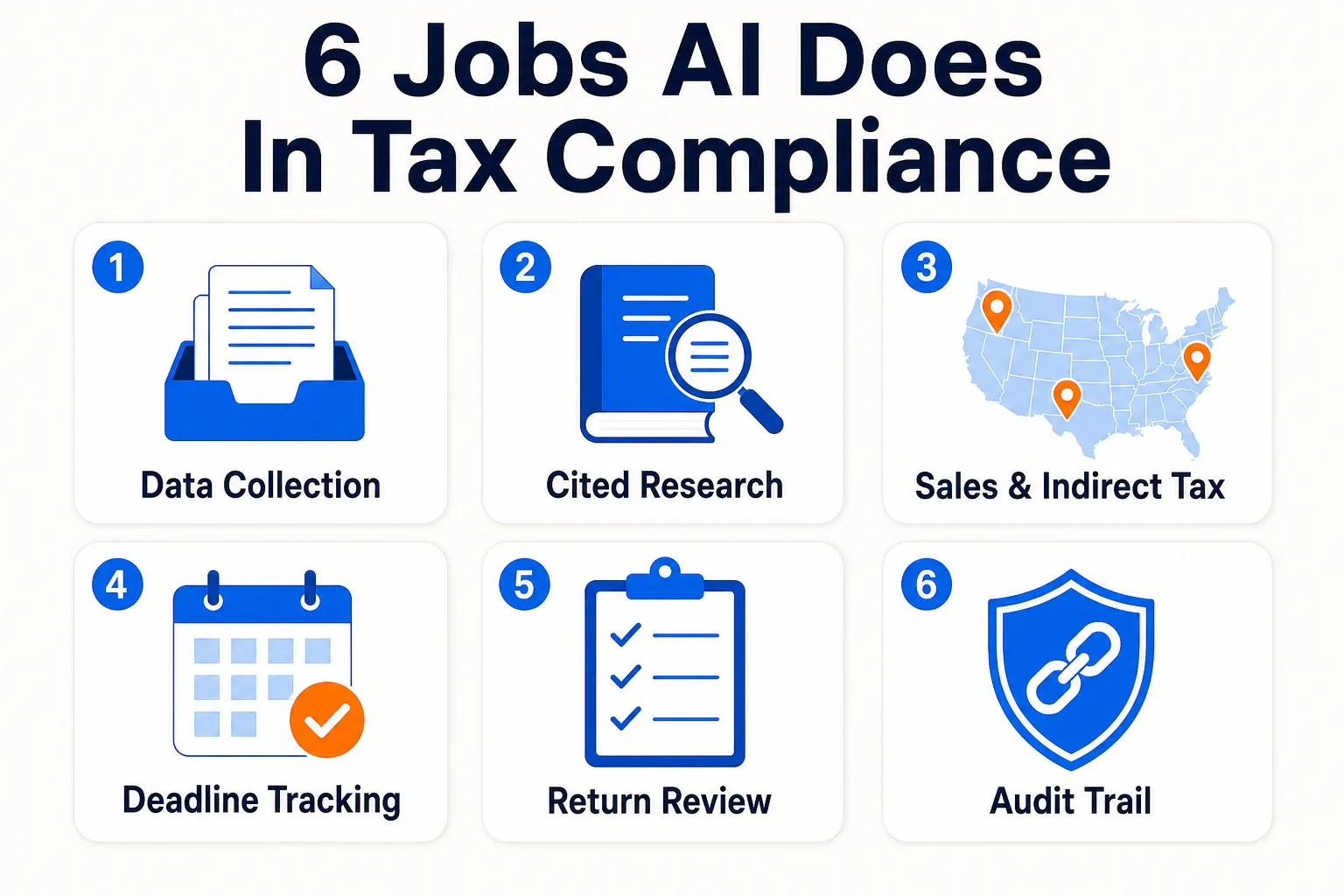
| Job | What the AI does | Where it stands |
|---|
| Data collection and extraction | Personalized intake, document chasing, structured data into the tax engine | Strong |
| Research and authority | Answers questions from primary law, with citations | Strong |
| Sales and indirect tax | Rate determination, nexus tracking, filing and remittance | Strong |
| Deadlines and workflow | Tracks filings, requests, and approvals across the calendar | Strong |
| Return review | Flags anomalies and missing items before sign-off | Useful, not a replacement |
| Audit trail | Ties every figure back to its source document | Strong |
The pattern is steady across all six. AI is good at reading documents, matching numbers, retrieving the rule, and remembering the deadline. The position you take and the signature you put on the return stay with your team, and every tool below is built on that assumption.
Getting the data right before it reaches the return
Most compliance errors start before anyone opens the tax software. A figure gets keyed wrong, a 1099 never arrives, a client answers the same question two different ways. Fixing intake fixes a large share of the problem.
StanfordTax pulls prior-year data from the major US engines, including Lacerte, UltraTax CS, Drake, ProConnect, ProSeries, CCH Axcess, and CCH ProSystem fx, then builds a personalized questionnaire so clients are not asked for documents they already sent. It covers 1040, 1120, 1120S, and 1065 returns, chases missing items on its own, and assembles a prep-ready binder as documents land. The free tier covers all four return types with no client minimum, which makes it the lowest-risk way to test the idea. The paid plan is $18 per return.
Soraban takes the same job further down the workflow. It replaces paper organizers with dynamic questionnaires, pushes extracted data into the tax engine at a vendor-claimed 97 percent accuracy, and handles branded return delivery with e-signature. Pricing is custom and quoted by sales. Historically it charged per return for collect-only or collect-and-deliver with an annual minimum, which favors firms running a meaningful volume of returns rather than a solo preparer. The accuracy of that data push is the part that matters for compliance, because every number it lands correctly is a number nobody has to re-key or catch later.
Taking a position you can defend
Filing is the easy part. The position behind it has to hold up, which means the answer traces back to primary law. This is where the gap between a purpose-built tool and a general chatbot is widest, and where a confident wrong answer costs the most.
Blue J answers tax questions from the Internal Revenue Code, Treasury regulations, IRS guidance, and case law, and links each answer to the authority behind it so you can open it and check before you rely on it. It covers US federal tax and state and local tax, plus Canadian and UK content for cross-border work, and supports conversational follow-up so a multi-step question does not restart from scratch. The sole practitioner tier is $1,498 per year per user, about $125 a month, with a 7-day free trial. More than 4,000 firms use it.
CoCounsel Tax does the same job inside Thomson Reuters Checkpoint, querying the IRC, regulations, IRS rulings, federal case law, and expert commentary, and returning sourced answers you can carry into a memo. If your firm already pays for Checkpoint, it is the natural add. If you are not on Checkpoint, there is no standalone option, so it is a bigger commitment. Pricing is bundled and quoted on request.
TaxGPT is the way to test the idea without a contract. It answers research questions with citations, compares treatments across states, and reviews returns for issues, and it connects to Drake, ProConnect, and UltraTax. The free tier covers up to 25 questions and one return review, enough to judge whether the answers hold up. It is built for US tax only, and the professional plans are custom-priced behind a demo. For a fuller comparison of these three, see our guide to the best AI tax research tools.
Sales and indirect tax: the compliance job that scales fastest
For firms with multi-state or multi-country clients, sales and indirect tax is where compliance gets out of hand quickest. Every new state adds rates, registration thresholds, and filing deadlines, and missing one becomes an exposure problem rather than a paperwork problem. This is also the most automatable corner of compliance, and the tooling is mature.
Avalara is the broad answer. It determines rates in real time, files and remits across all US states and more than 190 countries, manages exemption certificates digitally, and handles 1099 and W-9 e-filing. It works with over 1,400 business systems, and a partner portal lets a firm manage compliance for many clients in one place. Pricing is custom and sales-led, sized for clients with genuine multi-jurisdiction complexity.
Anrok is the specialist for software and digital-product clients. It monitors economic nexus across US states and VAT thresholds in more than 100 countries, and it tracks how employee locations affect nexus by reading headcount data from ADP, Workday, Rippling, or Gusto. The Starter plan is $100 per market per month, where a market is a tax jurisdiction such as a US state or country, with extra fees at high transaction volumes. If your book includes growth-stage tech companies, it is the purpose-built option. Either tool turns a manual, deadline-driven task into a monitored one, which is the whole point for indirect tax. The wider tax compliance and research category lists every tool in this space.
Keeping the calendar straight
A return that is correct but late is still a compliance failure. Practice management platforms hold the filing calendar together: deadlines, document requests, approvals, and the status of every client across the season.
TaxDome gives solo and small firms one platform for client portal, workflow, documents, e-signatures, billing, and built-in tax organizers, with AI features that triage client email and route documents to the right engagement. Pricing runs from $800 to $1,200 per user per year, billed annually, with no free trial. Canopy covers the same ground with AI checklist generation, email summarization, and form auto-fill, with deep IRS integrations that suit US tax-prep firms doing notice handling and tax-resolution work. Its Standard plan starts at $74 per user per month, billed annually, and there is a free trial. Both remove the coordination overhead that grows as return counts climb, which is when missed deadlines usually happen.
The audit trail and what stays human
Two more pieces complete the picture. The first is documentation. DataSnipper runs inside Excel, the place most small firms still build working papers, and matches source documents to figures with a full traceability trail. For compliance that trail is the asset: if a number is ever questioned, you can show exactly which document it came from without rebuilding the file from memory. DataSnipper is quoted directly by the vendor rather than at a public rate.
The second is enterprise scope. Thomson Reuters ONESOURCE handles corporate compliance that the tools above are not built for: income tax provision under ASC 740, indirect tax determination, transfer pricing documentation, and country-by-country reporting, with connectors into SAP, Oracle, and NetSuite. Pricing is sales-led. It is overkill for a small practice and the right answer once the client base includes multi-state corporations or consolidated groups.
What none of these tools do is take responsibility for the filing. They retrieve the authority; deciding how it applies to a client's facts is your call. They flag anomalies for a human to clear before the return is signed. They keep the trail, while the professional liability stays with the licensed preparer and the firm. The vendors say so plainly. For where this line falls across the wider workflow, our breakdown of what AI can and cannot do in tax preparation goes job by job.
Pricing at a glance
| Tool | Starting price | Compliance job |
|---|
| StanfordTax | Free tier; $18 per return | Intake, checklists, prep-ready binders |
| Soraban | Custom (priced per return) | Intake and accurate data into the tax engine |
| Blue J | $125 per user per month (annual) | Cited research across federal and SALT |
| CoCounsel Tax | Custom, bundled with Checkpoint | Research for firms on Thomson Reuters |
| TaxGPT | Free tier; custom paid plans | Research and return review, US only |
| Avalara | Custom | Multi-state and international sales tax |
| Anrok | $100 per market/month | Sales tax and VAT for SaaS clients |
| TaxDome | $800 per user per year | Deadline tracking and workflow |
| Canopy | $74 per user per month | Workflow for US tax-prep firms with IRS work |
| Thomson Reuters ONESOURCE | Custom, enterprise | Corporate and multi-state compliance |
Prices come from vendor-published pages and are re-checked with each update. Custom means the vendor quotes by firm or volume and publishes no list price.
Where to start
Start with the job that is costing you the most right now, not the one with the best demo.
If small errors and missing documents are the problem, fix intake first. StanfordTax costs nothing to test, and Soraban earns its keep once return volume passes 150. If a single bad research call could cost a client real money, add Blue J or test TaxGPT's free tier on live questions. If clients are selling across state lines, automate sales tax with Avalara or Anrok before the exposure builds up quietly. If deadlines and approvals are slipping through the cracks, a practice management platform pays back faster than any single AI feature.
Whatever you shortlist, run each option through a proper evaluation against your own workflow before signing. For the full set of tools a tax practice uses through the season, see our guide to the best AI tools for tax preparation, and for where compliance work sits next to audit, the tax and audit firm guide.
Common questions
Can AI keep my firm tax compliant on its own?
No. AI does the work around compliance well: it collects and extracts client data, answers research questions from primary authority, determines sales tax rates, tracks deadlines, and keeps an audit trail. It does not decide how the law applies to a client's facts, and it does not sign the return. The professional judgment and the liability stay with the licensed preparer. Treat these tools as faster hands for the licensed preparer, who stays responsible for the filing.
What does AI do for sales and indirect tax compliance?
It turns a manual, deadline-driven task into a monitored one. Tools like Avalara and Anrok determine the correct rate in real time, track when a client crosses an economic nexus threshold in a new state or country, manage exemption certificates, and file and remit on schedule. For multi-state and multi-country clients this is the corner of compliance where AI saves the most time and prevents the kind of missed registration that becomes an exposure problem.
How much does AI tax compliance software cost?
It ranges widely by job. Intake tools start free (StanfordTax) or are quoted per return by the vendor (Soraban). Research runs about $125 per user per month for Blue J, while CoCounsel Tax is bundled with a Thomson Reuters Checkpoint subscription. Practice management runs $74 to $149 per user per month for Canopy, and $800 to $1,200 per user per year for TaxDome. Sales tax tools (Avalara, ONESOURCE) and DataSnipper are quoted by the vendor based on firm size or volume rather than listed publicly.
Does AI create a problem with client data security?
It can if you do not check. Most of these tools are cloud-based and handle sensitive client tax data. Before adopting any of them, confirm in writing that the vendor does not use your client data to train shared models, that data is encrypted in transit and at rest, and that you can export or delete it on request. The guide to evaluating AI accounting software lists the full set of questions to ask.
The shortcut
If you would rather not scope ten vendors yourself, the CurateSuite matchmaker takes a few quick questions and returns the tools best matched to your firm's size, service mix, and budget. It is free, takes about a minute, and shows your results instantly with no sign-up.
The firms that stay out of trouble at filing time are the ones that fixed the weakest link before the season started.