Tax and audit are the two service lines where AI claims run hottest, and where the gap between a tool that earns its fee and a demo trick is widest. The short version for a small or mid-sized US firm: on the tax side, the real wins are research (Blue J, CoCounsel Tax), client intake (StanfordTax, Soraban), and sales tax automation (Avalara, Anrok). On the audit side, they are evidence work inside Excel (DataSnipper), confirmations (Circit), and risk scoring across the full transaction population (MindBridge). Almost everything else is either a niche fit or enterprise software wearing a friendly landing page.
This guide maps the whole tax and audit stack: what each job involves, which tools cover it, what they cost, and the order in which a firm should add them. It is written for US CPA firms and smaller practices that handle tax, assurance, or both. Pricing and capability details come from vendor-published specs, compared the same way across every tool, and are re-checked before each article update.
Where AI pays off, job by job
Strip away the marketing and tax-and-audit AI does six jobs. Some are mature, some are mostly promise. If you want the honest picture of what AI can and cannot do in practice, we keep a separate plain-English breakdown.
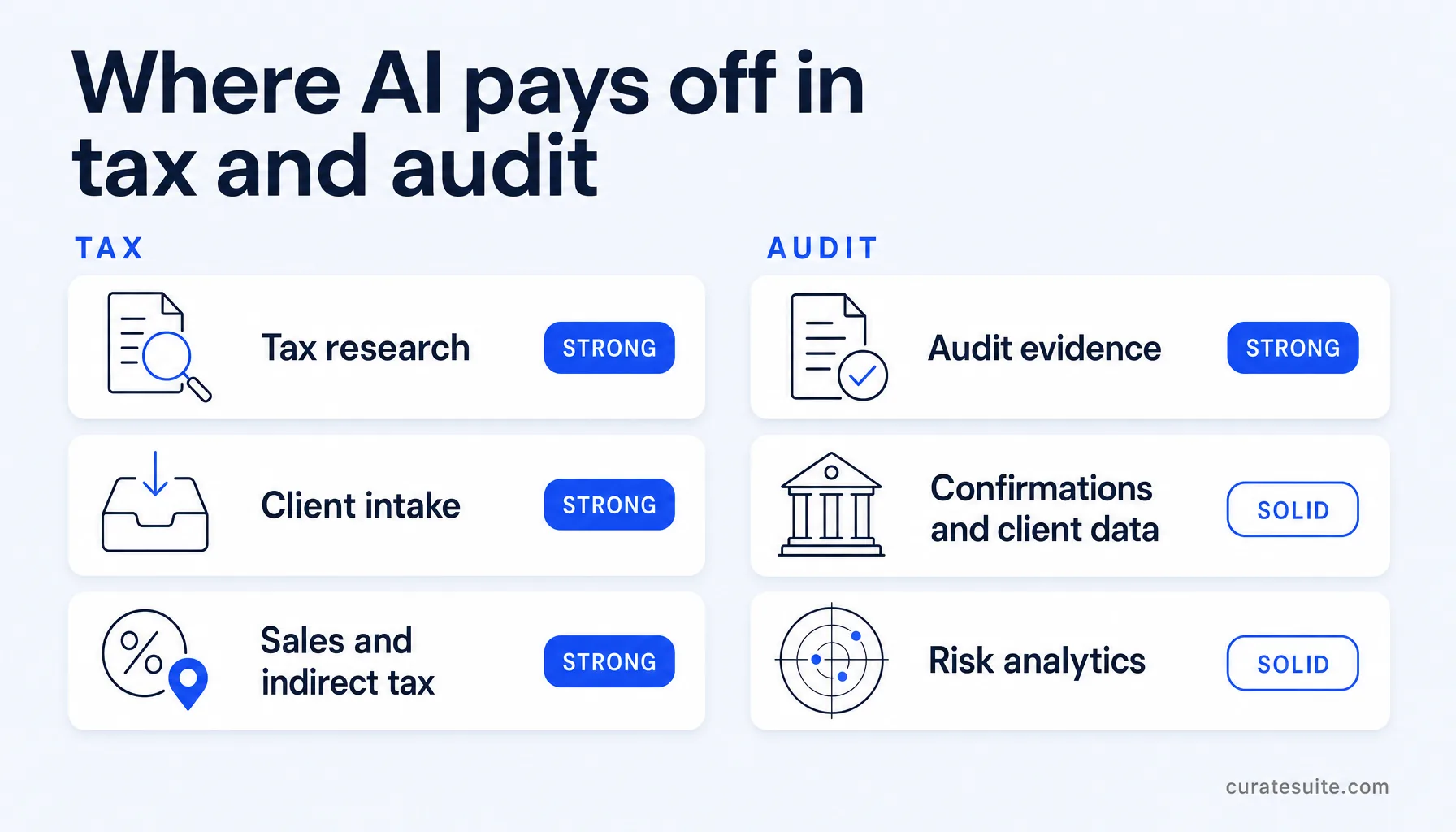
| Job | What the AI does | Maturity | Tools |
|---|
| Tax research | Answers tax questions from primary authority, with citations | Strong | Blue J, CoCounsel Tax |
| Client intake | Personalized organizers, document chasing, data into the tax engine | Strong | StanfordTax, Soraban |
| Sales and indirect tax | Rate determination, nexus tracking, filing and remittance | Strong | Avalara, Anrok |
| Audit evidence | Extracts data from documents, ties figures to working papers | Strong | DataSnipper, CaseWare |
| Confirmations and client data | Verified bank responses, direct ledger extraction | Solid | Circit, Validis |
| Risk analytics | Scores every transaction instead of a sample | Solid, mid-size and up | MindBridge |
The pattern across both service lines: AI is excellent at reading documents, matching numbers, and retrieving authority. The opinion and the signature stay with the partner, and every tool below assumes they will.
The tax side: research, intake, and the return itself
Start with what does not change. The return still gets built in Drake, Lacerte, ProConnect, UltraTax, or CCH Axcess. No AI tool on this page replaces the tax engine; they remove the hours around it.
Research has moved furthest. Blue J answers questions from the IRC, IRS guidance, case law, and Tax Notes commentary, with conversational follow-up for multi-step scenarios, and more than 4,000 firms use it. Pricing starts at $125 per user per month on annual billing, with a 7-day free trial. CoCounsel Tax does the same job inside Thomson Reuters Checkpoint, so it is the natural pick for firms already paying for that library; pricing is bundled and quoted on request.
Intake is the quiet winner for 1040-heavy practices. StanfordTax pulls prior-year data out of seven major US tax engines, personalizes this year's questionnaire, and assembles a prep-ready PDF binder as documents arrive. It has a genuine free tier, with paid plans from $18 per return. Soraban goes further along the workflow: smart intake, a vendor-claimed 97 percent accurate data push into Lacerte, UltraTax, Drake, and ProSeries, and branded return delivery with e-signature. Pricing is quoted in a demo and sized to return volume; historically it charged per return with an annual minimum, which makes it a fit for firms running real return volume rather than solos.
For the research and practice management layer in depth, including TaxDome, Canopy, ONESOURCE, and how to phase them, see our full guide to AI tools for tax preparation. The wider tax and research category lists every tax tool in the directory.
Sales tax and indirect tax
Multi-state clients turn sales tax into a moving target: every new state adds rates, registration thresholds, and filing deadlines. This is the most automatable corner of tax work, and the tooling is mature.
Avalara is the broad answer. It determines rates in real time, files and remits across all US states and more than 190 countries, manages exemption certificates digitally, and covers 1099 and W-9 e-filing. It connects to over 1,400 business systems, and a partner portal lets a firm manage compliance for many clients in one place. Pricing is custom and sales-led, sized for clients with genuine multi-jurisdiction complexity.
Anrok is the SaaS specialist. It was built for software and digital-product clients after the Wayfair decision, monitors economic nexus across US states and VAT thresholds in 100-plus countries, and even tracks how employee locations affect nexus by pulling headcount data from ADP, Workday, Rippling, or Gusto. The Starter plan is $100 per market per month, where a market is a tax jurisdiction such as a US state or country, with extra fees at high transaction volumes. If your book includes growth-stage tech companies, this is the purpose-built option.
One caveat for older recommendations you may find elsewhere: TaxJar, long the budget pick for e-commerce sellers, has been folded into Stripe Tax for new customers since the 2021 acquisition. Existing users can stay, but for new buyers the realistic shortlist is Avalara, Anrok, or Stripe Tax directly.
The audit side: evidence, confirmations, and analytics
Audit AI splits into two camps: tools that work inside the Excel environment your team already uses, and platforms that replace the environment. Knowing which camp you are buying from prevents most bad purchases.
DataSnipper is the stay-in-Excel camp, and it is the most common first AI purchase for small and mid-sized audit teams. It collects evidence, extracts data from PDFs, scans, and bank statements, and matches source documents to working papers with a full traceability trail. Over 600,000 users across 175 countries run it. DataSnipper is quoted directly by the vendor rather than at a public rate, and a trial is available. See DataSnipper on the vendor site.
CaseWare is the platform camp. It runs the full audit lifecycle: risk-based planning that auto-populates objectives and procedures, real-time collaboration on the engagement file, built-in journal entry analytics, and financial statement preparation. AiDA, its AI assistant, summarizes supporting documentation, and US firms can use OnPoint DAS, the AICPA-aligned methodology. Pricing is sales-led; realistic year-one spend runs into five figures, so it suits firms standardizing methodology across teams rather than a two-partner shop with thirty small audits. Many firms run both camps at once: CaseWare for methodology, DataSnipper inside it for speed.
MindBridge changes what testing means. Instead of sampling, it scores 100 percent of a client's transactions for risk, using models trained on over 260 billion transactions and more than 8,000 GAAP rules, then surfaces explainable anomalies the team can trace to source. It works with Xero, Oracle, and NetSuite data, is priced by custom quote, and pays back at mid-size engagement volume rather than on occasional audits.
Circit attacks the single most painful audit bottleneck: confirmations. Requests route through its network of tens of thousands of institutions directly to banks and counterparties, and verified responses come back with a full audit trail instead of letters that take weeks to return. Pricing is quoted by sales; it is used by firms from boutiques to the largest networks.
Validis fixes the start of the engagement. It connects to more than 100 accounting platforms, including QuickBooks, Xero, Sage, and Oracle, and pulls the general ledger in a standardized, audit-ready format, with a documented connection into CaseWare's OnPoint DAS. Big Four firms, Grant Thornton, and Withum use it. Custom-priced, and worth it at portfolio scale.
Everything above lives in the audit and risk category alongside the rest of the assurance stack.
Specialist corners: leases, contracts, and regulated reporting
Three tools earn a mention for specific situations rather than every firm.
Trullion handles lease accounting under ASC 842 and IFRS 16, plus financial statement validation, on a principle the vendor calls auditable AI: every output ties back to a source document or standard. If your clients carry significant lease portfolios, it is the specialist answer. Kira, now part of Litera, extracts clauses and risk indicators from large contract sets, which makes it relevant for firms doing M&A or financing due diligence rather than core audit. Workiva connects data across SEC filings, ESG disclosures, SOX controls, and audit evidence so one number stays consistent everywhere; it is enterprise software for organizations with regulated reporting obligations, not small-firm kit. All three are custom-priced.
Pricing at a glance
| Tool | Starting price | Firm size | Best for |
|---|
| Blue J | $125 per user per month (annual) | Solo to mid | AI tax research with cited authority |
| CoCounsel Tax | Custom, bundled with Checkpoint | Small to mid | Research for firms on Thomson Reuters |
| StanfordTax | Free tier; $18 per return paid | Solo to mid | Tax intake and prep-ready binders |
| Soraban | Custom (priced per return) | Small to mid | Intake to delivery for 1040 volume |
| Avalara | Custom | Solo to mid | Multi-state and international sales tax |
| Anrok | $100 per market/month | Small to mid | Sales tax and VAT for SaaS clients |
| DataSnipper | Custom | Small to mid | Audit evidence inside Excel |
| CaseWare | Custom | Small to mid | Full audit platform and methodology |
| MindBridge | Custom | Mid | Full-population risk analytics |
| Circit | Custom | Mid | Bank confirmations and verification |
| Validis | Custom | Mid | Client ledger data extraction |
| Trullion | Custom | Mid | Lease accounting and FS validation |
Prices come from vendor-published pages and are re-checked with each article update. Custom means the vendor quotes by firm or volume and publishes no list price.
How to sequence the stack
The right order depends on which service line pays your bills.
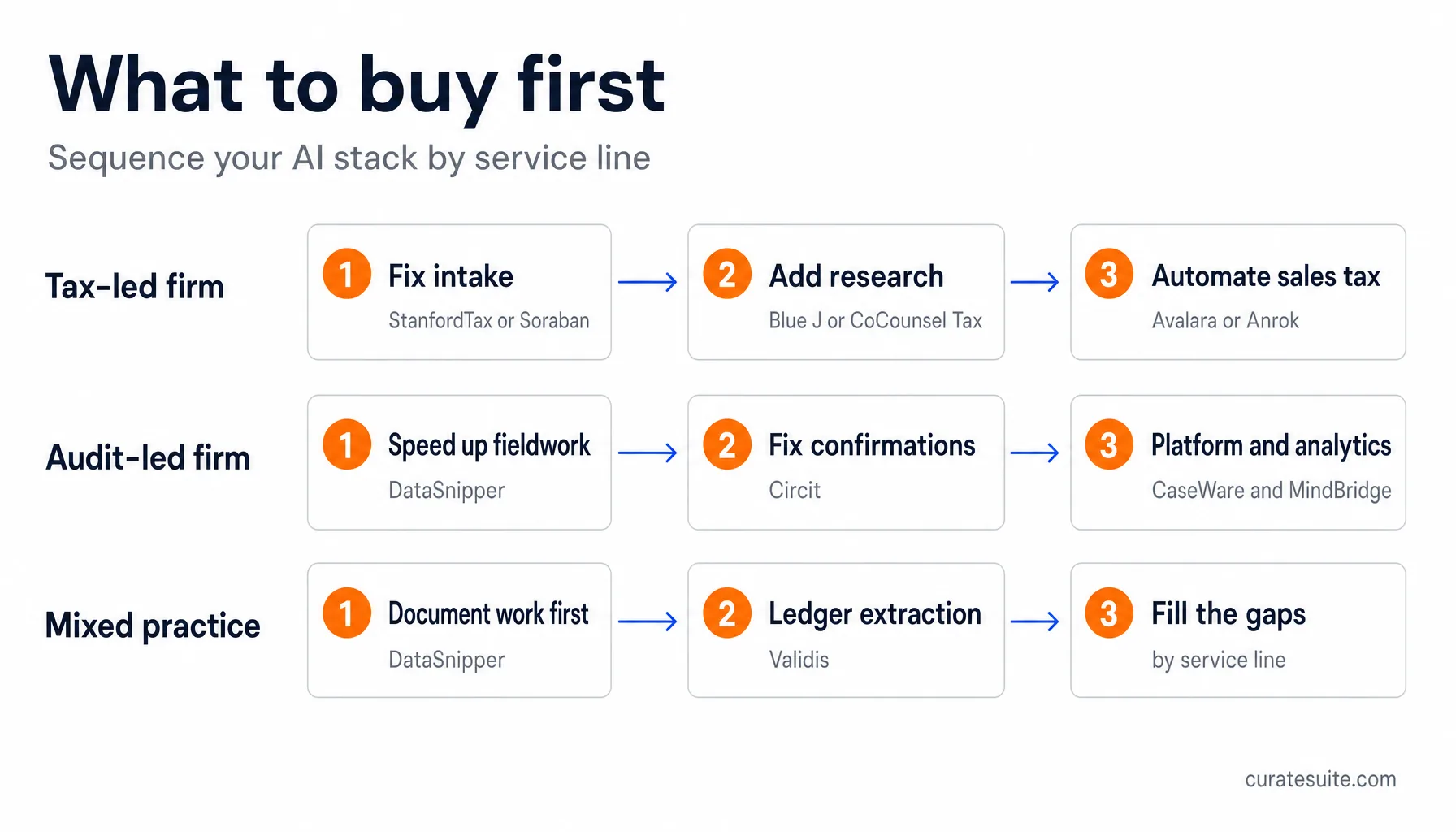
- Tax-led firms should fix intake first. StanfordTax (free to start) or Soraban removes the document chase that eats the front of every season. Add Blue J or CoCounsel Tax when research volume justifies it, and sales tax automation when multi-state clients appear.
- Audit-led firms should start with DataSnipper, because it speeds up fieldwork without changing how anyone works. Circit comes next if confirmations are the bottleneck. CaseWare is a methodology decision, not a quick win, and MindBridge starts paying back once recurring engagements justify portfolio pricing.
- Mixed practices get the most from tools that serve both lines: DataSnipper covers tax working-paper cross-referencing as well as audit evidence, and Validis-style ledger extraction feeds advisory work too.
Whatever the order, run each purchase through a proper evaluation before signing: the tools above differ far more in fit than in headline capability. And if your firm needs the broader stack beyond tax and audit, the main roundup of AI tools for accountants covers bookkeeping, reporting, and practice management.
Common questions
Can AI actually do audit work?
It does specific audit jobs: extracting evidence from documents, matching figures to working papers, scoring transactions for risk, and routing confirmations. Judgment, scoping, and the opinion remain with the engagement team. Treat every tool on this page as a faster pair of hands, not a junior with a license.
How much does AI audit software cost?
DataSnipper quotes its pricing directly rather than publishing a public rate. Most of the rest (CaseWare, MindBridge, Circit, Validis, Trullion) also quote custom prices based on firm size, portfolio, or transaction volume, and platform-level tools typically run to five figures in year one. Budget for onboarding time as well as licenses.
Mostly yes, because the jobs differ: research and intake for tax, evidence and analytics for audit. The overlap is document work. DataSnipper serves tax working-paper cross-referencing as well as audit fieldwork, which is one reason it is often a mixed practice's first purchase.
What should a small firm buy first?
Match the purchase to the bottleneck. If January means chasing client documents, fix intake. If fieldwork drags, put DataSnipper inside Excel. If clients sell across state lines, automate sales tax before it becomes an exposure problem. Buying the impressive demo instead of the actual bottleneck is the most common mistake.
The shortcut
If you would rather not scope twelve vendors yourself, the CurateSuite matchmaker takes a few quick questions and returns the tools best matched to your firm's size, service mix, and budget. It is free, takes about a minute, and shows your results instantly with no sign-up.
Tax season rewards the firms that picked their tools in June.