An invoice is not a receipt with a different name. A receipt usually needs three fields: vendor, date, total. A supplier invoice needs those plus a line for every item or service billed, the tax treatment on each line, and often a purchase order number to match against. That difference sounds small until you check what each OCR tool actually extracts, and it turns out a quarter of the tools marketed for this job do not pull line items at all. They read the header and stop.
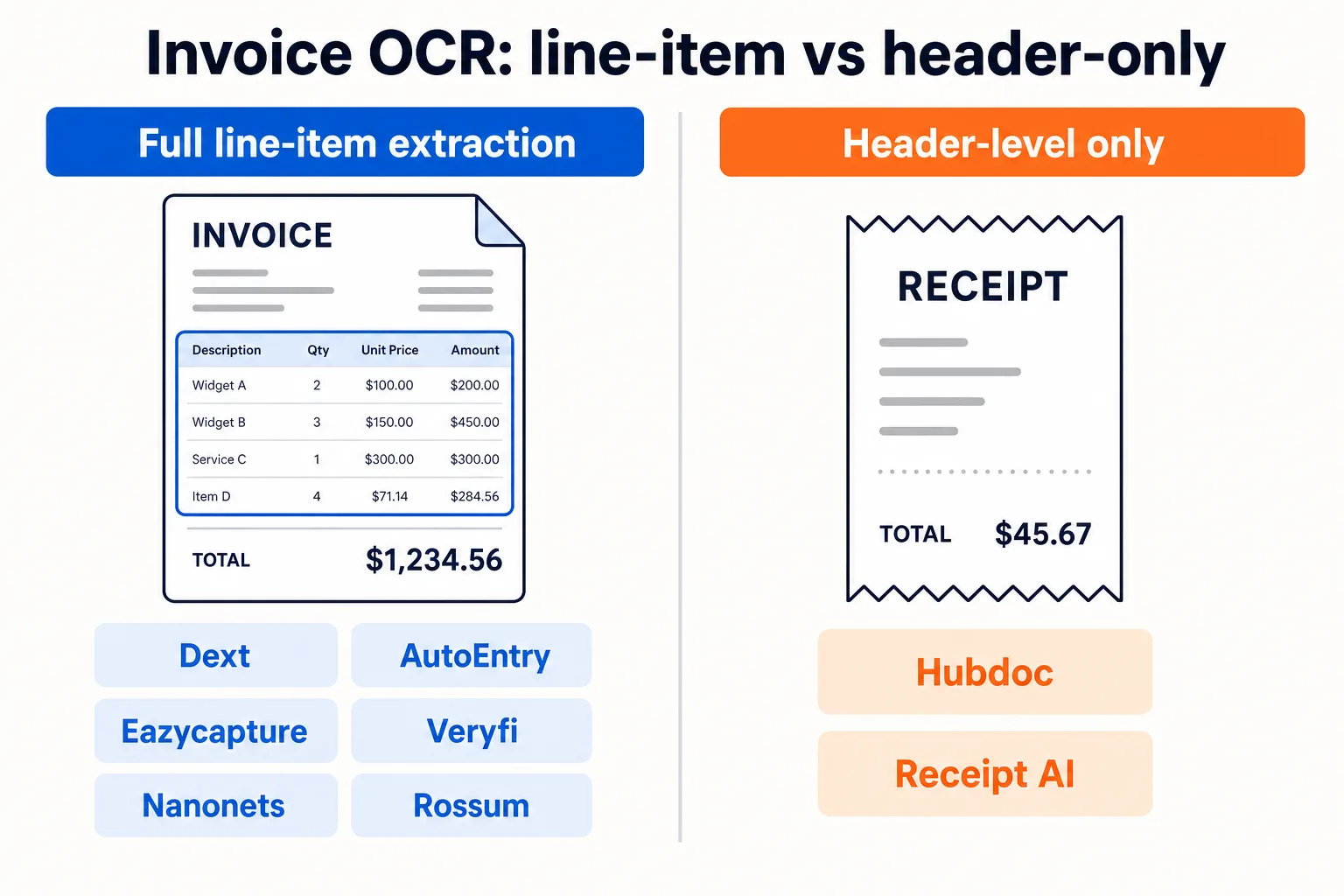
Eight tools in CurateSuite's document capture catalog handle invoices in some form. Cross-checking what each vendor's own product pages describe, six extract full line-item detail from a supplier invoice: Dext, AutoEntry, Eazycapture, Veryfi, Nanonets, and Rossum. Two describe header-level capture only, vendor, date, and total, with no line-by-line breakdown: Hubdoc and Receipt AI. If your firm needs to code a 12-line supplier invoice by tax rate and cost category, the second group will not do that for you, no matter how the marketing copy reads.
For the broader picture across receipts, invoices, and bank statements sorted by pricing model, see our full guide to OCR and document capture software for accountants. This piece stays narrow: which tools actually process a multi-line invoice, and what each one costs to run.
The short answer
- Complex, multi-currency, multi-line supplier invoices: Dext handles line-item extraction and categorization suggestions on invoices that trip up simpler tools, priced by document volume on a custom quote.
- Credit-based extraction without per-seat fees: AutoEntry reads line items from $13 a month for 50 credits, with unlimited users on every tier.
- UK practices: Eazycapture extracts line-item detail from about GBP 7 per client per month, with Xero and QuickBooks sync.
- Building invoice extraction into your own systems: Veryfi and Nanonets are API-first, both pulling line items, tax amounts, and currency codes, with usable free tiers.
- High-volume finance teams pushing invoices into an ERP: Rossum extracts header and line-item data and routes it through approval workflows into SAP, NetSuite, or Oracle, starting at $18,000 a year.
- Xero-only firms with simple, single-rate supplier bills: Hubdoc is free on paid Xero plans and covers header-level capture without extra cost.
The rest of this article breaks down that line-item split tool by tool, what each one costs, and how to pick without paying for extraction depth you do not need.
What invoice OCR software actually needs to extract
A receipt-capture tool that reads "Staples, $47.20, March 3" has done its job. An invoice-processing tool handling a supplier bill for office equipment, freight, and installation, each taxed differently, has not done its job until it separates those three lines with their own amounts and tax codes. That separation is what "line-item extraction" means in practice, and it is the feature that lets a firm auto-code a complex invoice instead of retyping it.
Header-only capture is not a failure. It is a narrower, cheaper product built for a narrower job: simple, single-rate bills where the total is the only number that matters. The mismatch happens when a firm buys a header-only tool expecting it to code line-by-line, or pays for full line-item extraction on client invoices that never carry more than one line anyway.
Full line-item extraction: Dext, AutoEntry, Eazycapture, Veryfi, Nanonets, Rossum
Dext reads receipts, invoices, and bank statements and posts structured data, including individual line items, into QuickBooks, Xero, Sage, or Excel. Its edge over the lighter tools in this group is accuracy on complex, multi-currency, multi-line invoices, the documents most likely to need manual correction elsewhere. Pricing is a custom quote structured around document volume, with a free trial and no permanent free tier.
AutoEntry extracts line items from receipts, invoices, bank statements, and supplier documents, then publishes them into Sage, Xero, QuickBooks, or FreeAgent. It runs on credits rather than seats, one credit per document, from $13 a month for 50 credits up to $469 for 2,500, with unlimited users and a 90-day credit rollover on every tier. It does not add AI coding suggestions on top of the extraction the way Dext does.
Eazycapture is built for UK practices and reads receipts, invoices, and bank statements including line-item detail, syncing into Xero and QuickBooks. It prices per client rather than per user, from about GBP 7 a month on annual billing, with unlimited team members bundled in.
Veryfi is an API and SDK product rather than a ready-made portal: send it a document image and it returns structured JSON with line items, tax amounts, vendor details, and currency codes, in seconds, across 38 languages. The free tier covers 100 documents a month; the Starter tier charges $0.16 per invoice against a $500 monthly minimum, a higher rate than its $0.08 receipt price, which reflects the extra work multi-line documents take to parse correctly.
Nanonets reads the header and line items on an invoice, codes it, and pushes the result into QuickBooks Online, Xero, Sage Intacct, NetSuite, SAP, or Microsoft Dynamics. Pricing is usage-based, starting free with $50 in credits, then running from about $0.02 for a simple extraction to $0.30 for a complex one.
Rossum is the one tool in this catalog built specifically around invoices and purchase orders rather than receipts. Its Aurora Document AI engine extracts header and line-item data, matches it against a master vendor list, flags duplicates, and routes documents through validation into SAP, NetSuite, Oracle, Microsoft Dynamics, or QuickBooks. Pricing starts at $18,000 a year on the Starter tier, which puts it well outside the range of a small practice and squarely in mid-market and enterprise finance team territory.
Header-level capture only: Hubdoc, Receipt AI
Hubdoc fetches bills, receipts, and bank statements from supplier portals and financial institutions and pushes the extracted fields into Xero or QuickBooks. Its own product description draws the line clearly: firms that need line-item AI coding are pointed toward Dext or AutoEntry instead. Hubdoc is included free with any paid Xero plan, or about $12 a month per business standalone, which makes it the cheapest way to handle simple, single-rate supplier bills.
Receipt AI is built for exactly what its name says: receipts sent by text, email, or photo, filed into QuickBooks Online or Xero the moment they arrive. Invoices are not part of its stated feature set. For a firm specifically shopping for invoice OCR, Receipt AI is the wrong tool regardless of price, worth including here only so it does not get confused with the invoice-capable options above.
Pricing for invoice-specific volume
| Tool | Extraction depth | Starting price | Best fit for invoices |
|---|
| Dext | Full line-item | Custom quote from sales | Complex, multi-currency invoices |
| AutoEntry | Full line-item | $13/month (50 credits) | Unlimited users, uneven volume |
| Eazycapture | Full line-item | About GBP 7/client/month | UK practices |
| Veryfi | Full line-item | Free to 100 docs, then $500/month minimum | Developers embedding extraction |
| Nanonets | Full line-item | Free with $50 credit, then $0.02 to $0.30/run | Configurable AP workflows |
| Rossum | Full line-item + PO match | $18,000/year | High-volume ERP finance teams |
| Hubdoc | Header only | $0 with paid Xero, $12/business standalone | Simple, single-rate bills |
| Receipt AI | Receipts only, no invoice support | $29/month | Not built for invoices |
Figures reflect what each vendor publishes as of this writing. Confirm current pricing on the vendor's own page before committing, since custom-quoted tiers move with volume.
How to choose without paying for depth you do not need
Start with one question: do the supplier invoices your firm processes carry more than one line, with different tax treatments or cost categories on each? If most client bills are simple, one rate, one total, a header-level tool like Hubdoc costs less and does the job. If invoices routinely need splitting across cost centers or tax rates, a header-only tool just shifts the typing from the invoice to a spreadsheet, and the line-item group above is worth the extra cost.
The second question is where the coded invoice needs to land. QuickBooks, Xero, Sage, and FreeAgent are covered by every tool in the line-item group except Rossum, which targets SAP, NetSuite, Oracle, and Microsoft Dynamics instead. A firm on a small-business ledger sending invoices to Rossum is paying enterprise pricing for a connector it does not need; a finance team on NetSuite trying to force Dext or AutoEntry into that role will hit the same wall from the other direction.
Volume shape narrows the last mile. A firm with many clients each sending a handful of invoices a month fits per-client pricing (Eazycapture) or a low per-credit rate with unlimited users (AutoEntry) better than a per-document API bill. A firm or software team with unpredictable, spiky volume gets more out of Veryfi or Nanonets, where the cost tracks actual usage instead of a flat client or seat fee. For the fuller pricing-mechanism breakdown across the whole document-capture category, including receipts and bank statement conversion, that guide sorts all ten catalog and non-catalog tools by how they bill rather than by invoice depth alone.
Whichever way the two questions point, check the document capture and extraction category for the current tool list and specs before signing an annual contract, since pricing and integration lists shift as vendors update plans.
Common questions
What is the difference between invoice OCR and receipt OCR?
Mostly extraction depth. Receipt OCR needs to read one vendor, one date, one total. Invoice OCR needs to separate the invoice into individual lines, each with its own amount and tax treatment, and often match it against a purchase order. Many tools handle both document types, but not all of them extract invoices at the line-item level; Hubdoc is an example that reads invoice headers without breaking out the lines.
Does invoice OCR software handle purchase order matching?
Rarely, among the tools built primarily as document-capture products. Rossum is the exception in this catalog, matching extracted invoice data against a master vendor and purchase order list as part of its workflow. Full three-way matching, tying an invoice to a purchase order and a goods receipt, is more commonly a feature of dedicated accounts payable automation platforms rather than standalone OCR tools.
How accurate is AI invoice extraction?
Vendor-published figures cluster in the mid-to-high 90s for standard fields (vendor, date, amount, tax) on clean, typed invoices. Accuracy drops on photographed paper documents, handwritten notes, and unusual multi-currency or multi-line formats, where the more established tools in the full line-item group tend to hold up better than lighter capture tools. Treat any AI-extracted invoice as a draft for review rather than a finished, unchecked entry.
Can invoice OCR software replace manual data entry entirely?
For the fields it extracts, yes, in the sense that nobody retypes the vendor, date, amount, or line items by hand. What it does not remove is review: coding exceptions, unusual suppliers, and low-confidence extractions still need a human check before posting. The realistic gain is fewer keystrokes and fewer transcription errors, not a fully unattended process.
Why do Veryfi and Nanonets charge differently per document type?
Both price by the complexity of the extraction, not a flat per-document rate. Veryfi charges $0.08 for a receipt and $0.16 for an invoice because an invoice typically has more fields and more lines to parse correctly. Nanonets runs from about $0.02 for a simple extraction to $0.30 for a complex one for the same reason. The pricing itself is a signal of how much work the line-item split actually takes on the vendor's side.
If you would rather skip the comparison shopping, the CurateSuite matchmaker takes a few questions about your firm's document volume and ledger and returns the tools that fit, no email required to see the results.