
CurateSuite
Guide7 min read

Best AI Tools for Bookkeepers: From Data Entry to Client Delivery

AI tools for bookkeepers mapped across 101 tracked apps: 53 claim bookkeeping help, but only 3 focus on client delivery. Use this stage-by-stage stack guide to close that gap.

By CurateSuite
Isometric conveyor belt carrying small document icons through two arch-shaped stations. Most icons accumulate where the belt is broken; a few cross a short ramp into a glowing orange open-envelope badge.

The catalog we keep at CurateSuite currently holds 101 AI tools for accounting work, and 53 of them tag themselves for bookkeeping. Inside those 53 the split is lopsided. Nine products live in the capture bucket, pulling source documents into structured data. Thirty-four more sit in what we could call process, meaning transaction matching, categorization, bill pay and payments. Five are built for the review layer, catching mistakes before a client sees them. Three exist for the final stage, deliver, which is where the client gets asked, updated and handed a finished result. Two more tools sit in forecasting and FP&A, outside the four-stage engagement flow this article walks through.

Run those last two numbers against each other and the shape of the whole category shows up. For every tool built to move work out to a client, there are roughly eleven built to shove it through a back office first. The market has spent years making the middle of the engagement faster and almost no time making the end of it easier for the bookkeeper. That is the gap this article works through, stage by stage.

How the catalog lines up against a real engagement

A bookkeeping job moves through four real stages no matter which firm runs it. First, capture: source documents have to become structured data. Second, process: transactions get sorted, matched, and bills get paid. Third, review: errors get fixed before they reach the client. Fourth, deliver: the client gets asked, updated, and handed the result. The table below maps those stages to the bookkeeping-tagged tools we track.

StageWhat the tool is doingTool count
CaptureInvoice, receipt and bank document extraction into structured data9
ProcessLedger posting, bank matching, categorization, bill payment34
ReviewError checks, anomaly flags, audit-trail cleanup before client sees work5
DeliverClient checklists, document requests, task visibility, closing conversations3

The weight is on the first three. If your firm has grown past a handful of clients, the whole stack shifts with headcount, and the hub article for that is AI tools by firm size. This piece is one spoke of that wheel, focused on a single engagement from first document to client handoff.
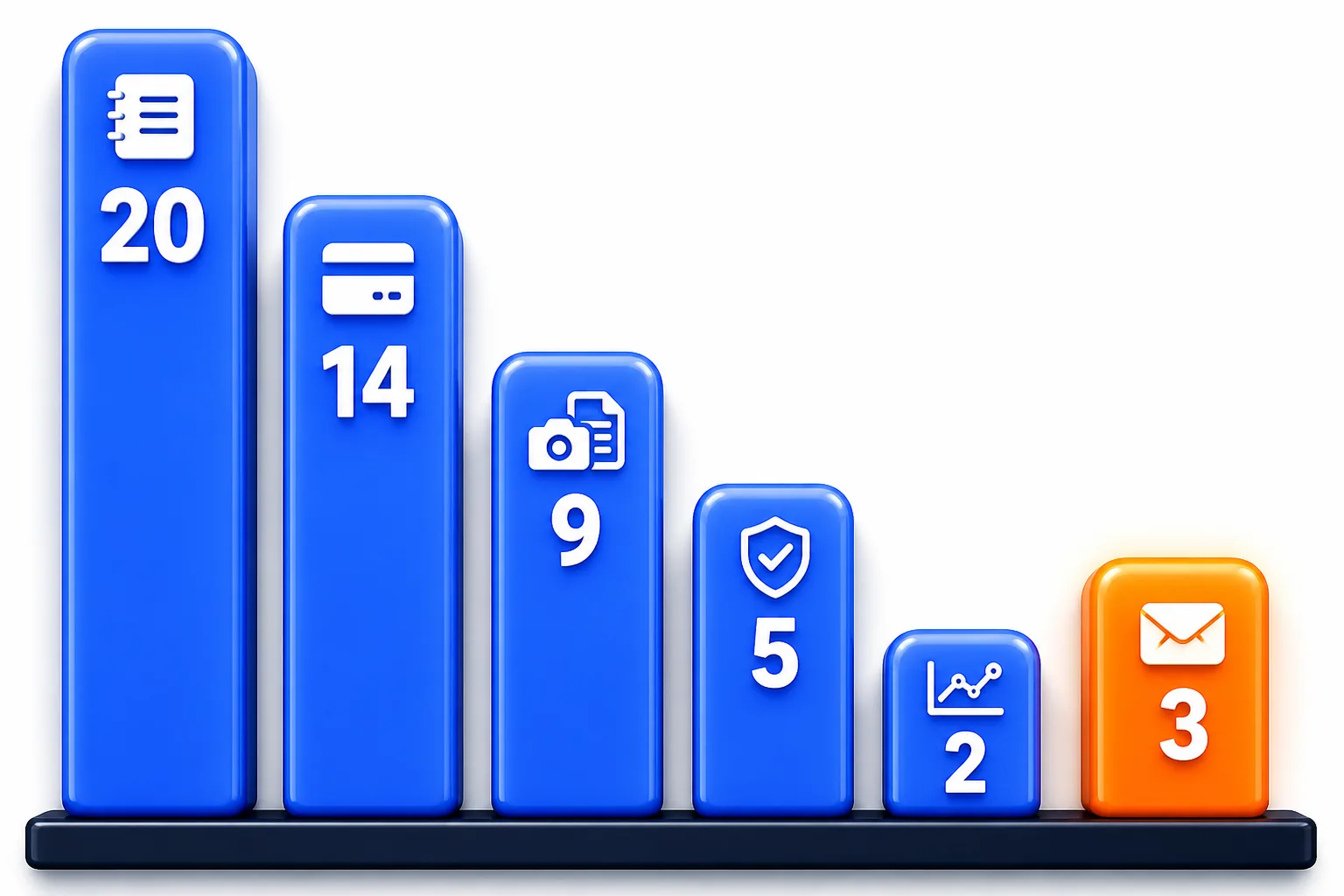
Bar chart showing six catalog categories for bookkeeping-tagged AI tools. Audit/risk has 5 tools, practice management 3, FP&A 2, capture 9, AP/AR 14, and core ledger 20. The practice management bar is short and orange; the rest are blue.

The chart shows the same shape another way. Processing and capture dominate; delivery is a sliver. The FP&A tools sit outside the four-stage flow, but they are part of the same 53-tool category. The rest of this article walks that flow in order and names the tools a small firm would actually touch at each stage.

Capture: the oldest problem in the space

Capture is where every engagement starts, because nothing else moves until source documents become structured data. Dext is the standard tool for many small firms, pulling receipts, invoices, and supplier statements into a posted transaction. Hubdoc does the same job with a tighter Xero sync and a standalone plan at $12 a month per business. Both have been around long enough that capture no longer differentiates firms. It is table stakes now, even if nine of the fifty-three bookkeeping-tagged tools still list it as their main job.

Process: where the market put its weight

Process is the stage where the category is most crowded, because it is where most of the ledger work actually happens. QuickBooks Online bundles bank-feed matching and rule-based categorization inside the subscription, so most bookkeepers never think of it as an AI tool at all. Xero runs the same play in the markets where it leads, particularly the UK, Australia, and New Zealand, with growing adoption in Canada. Thirty-four of the fifty-three bookkeeping-tagged tools sit in this bucket, and most of those are features inside ledgers, bill-pay add-ons, and AP automation layers. That is the oldest AI use case in accounting, and for most firms it is already paid for.

The practical read is simple. A bookkeeper who is not using the process AI already inside their ledger is leaving speed on the table, but buying a separate categorization tool on top of QuickBooks or Xero rarely makes sense unless the firm has outgrown the built-in rules.

Deliver: the three tools that actually close the loop

This is the stage where the 11-to-1 ratio shows up in real life. Out of 53 bookkeeping-tagged tools, exactly three exist to move work out to the client. All three are practice-management products, not bookkeeping products in the traditional sense. Two of them stay client-facing only; Keeper is the exception, with two-way sync to QuickBooks Online and Xero and automated file review that catches miscategorizations and reconciliation gaps ahead of close. All three solve the same cluster of problems: chasing documents, answering client questions, and showing progress on a close.

Keeper stands apart from the other two by syncing with QuickBooks Online and Xero and reviewing files automatically, priced at $200 a month per firm on annual billing.

Financial Cents keeps client task tracking and workflow boards simple, with a solo plan at $19 a month on annual billing, single user.

ClientHub focuses on client checklists and document requests, and like Financial Cents it does not post transactions or catch coding errors.

Content Snare covers the same delivery job outside the 53, mainly for tax and advisory firms, with a basic plan at $35 a month on annual billing.

The Karbon 2026 State of AI in Accounting survey asks accounting professionals directly about AI's effect on collaboration and communication with clients, and 82 percent of respondents rate that impact positively. That is the number that makes the gap matter. Firms have spent a decade automating the back office and then paid for it in client-communication time on the other end. The three product options in this stage are the beginning of the fix, not the end of it.

The order to buy in a small firm

Sequencing matters because every bookkeeper runs on three constraints at once: cash flow, client volume, and attention. Trying to fix all four stages in one quarter is how a firm ends up with five subscriptions and no new workflow. The order that usually holds:

  1. Capture first, because it pays back fastest on real document volume. A firm with forty clients and shoeboxes of receipts gets more relief from Dext or Hubdoc than from any other purchase.
  2. Then use the process AI already inside the ledger. QuickBooks Online or Xero already include the matching and categorization layer most small firms need. Do not buy a separate tool here until the built-in rules clearly stop scaling.
  3. Then add a review layer once the cost of a mistake grows with the number of clients. A five-client bookkeeper catches mistakes by eye. A sixty-client bookkeeper needs the flags.
  4. Then, finally, buy a dedicated deliver tool once chasing clients by email is the binding constraint. For most firms this is the last purchase, and it is the one the market gives them the fewest options for.

That order changes once a firm grows past the small-firm stage. A practice that has added real staff, roughly 10 to 50 people, layers close-management and audit-grade tooling on top of this same stack, and that sequence is laid out in AI tools for a mid-size accounting firm. The stage logic does not change when headcount does; the tools just get heavier.

The gap is the opportunity

The full product roundup for every workflow stage this site tracks, including the ones beyond bookkeeping, lives in the complete picks list for 2026. This article deliberately does not repeat that list, because the point here is different. A bookkeeper does not need more capture tools. They need to know that the market has mostly ignored the end of the engagement, and that the three delivery tools named here are the entire current answer within the bookkeeping tag.

If your firm is not sure where its own gap sits, the one-minute matchmaker quiz maps your answers to firm-specific matches without taking an email address. The more useful way to read the 53-tool category is not as a list of options. It is as a map of priorities: the middle is crowded, the beginning is commoditized, and the end is where the advantage now sits for a bookkeeper who wants to keep clients without drowning in follow-up.

Find the right AI tools for your firm

Seven questions, two minutes, a short list of the five tools that fit your firm best. Your results, instantly. No sign-up needed.

Take the matchmaker

Tools referenced in this article

More articles

Last updated 2026-08-25. Tool comparisons are based on vendor-published specs. See our methodology.