CurateSuite
Guide7 min read

AI vs OCR for Accountants: What Is the Difference?

OCR reads a document. Whether a capture tool also codes the transaction to a ledger account is the real AI layer, and only 4 of 9 tools in CurateSuite catalog do it. Here is how to spot the difference before you buy.

By CurateSuite
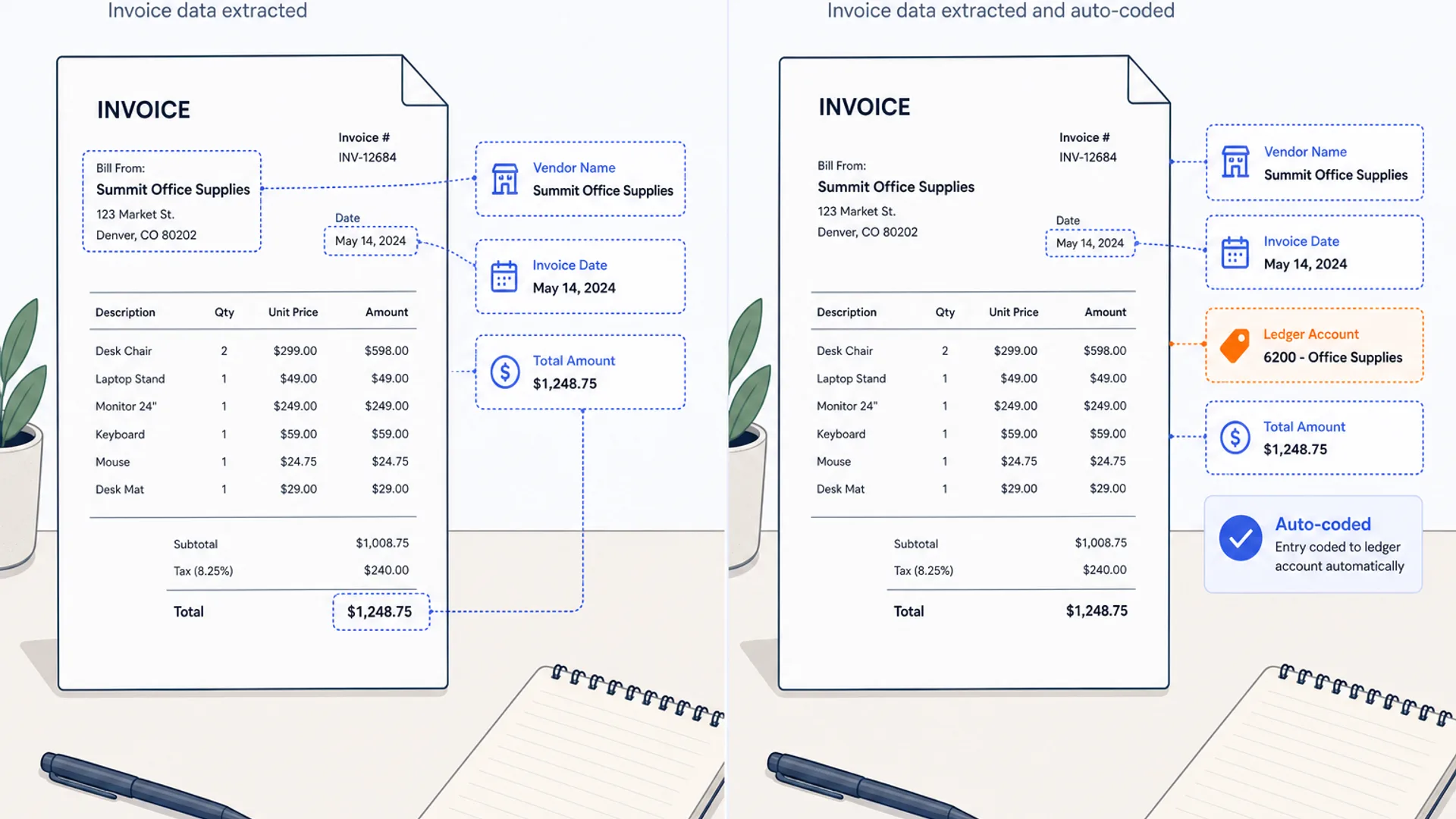
Split-screen flat-lay of a paper invoice on the left with a simple text-extraction overlay, and the same invoice on the right with an extraction overlay plus a ledger account code and a small confidence check mark, on a warm off-white desk surface with brand blue and orange accents

Vendors in document capture use "AI" and "OCR" almost interchangeably, sometimes in the same sentence about the same product. That makes the two words feel like marketing dressing rather than a real technical distinction, and for the base reading step, they mostly are. The distinction that actually matters sits one layer up: whether the tool stops once it has pulled the vendor, date, and amount off a page, or whether it goes on to decide which ledger account that transaction belongs to.

Of the nine document capture tools in CurateSuite's document capture and extraction category, four do the second job. Dext, Nanonets, Receipt AI, and Docyt all code the transaction to an account, and Dext's coding improves as a bookkeeper corrects it. The other five, AutoEntry, Hubdoc, Eazycapture, Veryfi, and Rossum, extract clean structured fields and stop there, leaving the coding decision to the accountant or to rules set up separately in the accounting software. Neither approach is the wrong one, but buying a tool assuming it handles coding when it only handles extraction is how a firm ends up doing the coding by hand anyway, on top of a monthly subscription.

What OCR actually does

Plain OCR is a reading job. Point it at a scanned receipt or a PDF invoice and it turns pixels into characters, then maps those characters to fields: vendor name, invoice date, total, tax, sometimes individual line items. That is the part every tool in this category shares, and it is also the part that has gotten commodity-cheap. Vendor-published accuracy figures on clean, typed documents cluster in the low-to-mid 90s across the field, whether the vendor calls the product "OCR" or "AI-powered."

What differs is document scope and how far the pipeline runs past that reading step. AutoEntry reads receipts, invoices, and bank statements and says so directly: it "focuses on extraction, not coding." Hubdoc fetches bills and statements from supplier portals and banks and pushes the fields into Xero or QuickBooks, narrower in scope than tools built around coding rules. Eazycapture covers similar ground for UK practices, reading receipts, invoices, and bank statements, including line items, and extracting them ready to post into Xero or QuickBooks, with no account-coding step described on its own product pages. Veryfi and Rossum go further on document variety and volume, Veryfi across 38 languages and more than 110 data fields, Rossum through configurable validation screens for enterprise invoice volume, but both hand off a clean, structured record rather than a coded one. That is a full, legitimate job. It is also, by any reasonable definition, still OCR.

What the AI layer usually adds

The step that turns extraction into something closer to bookkeeping is coding: assigning the transaction to a specific account, and getting better at that assignment as a person corrects it. Dext builds categorization rules from prior postings, so a supplier the tool has coded before needs less correction the next time it shows up. Receipt AI categorizes each receipt automatically at the moment of capture, whether it arrives by text, email, or photo. Nanonets codes extracted invoice line items and pushes the coded transaction into the ledger. Docyt pulls transactions from bank feeds and point-of-sale systems overnight and categorizes them against the client's chart of accounts before a bookkeeper opens the reconciliation dashboard each morning.

That coding layer is the genuine reason a document capture tool earns the AI label rather than the OCR one. It is not about reading accuracy, and it is not about which word appears on the pricing page.
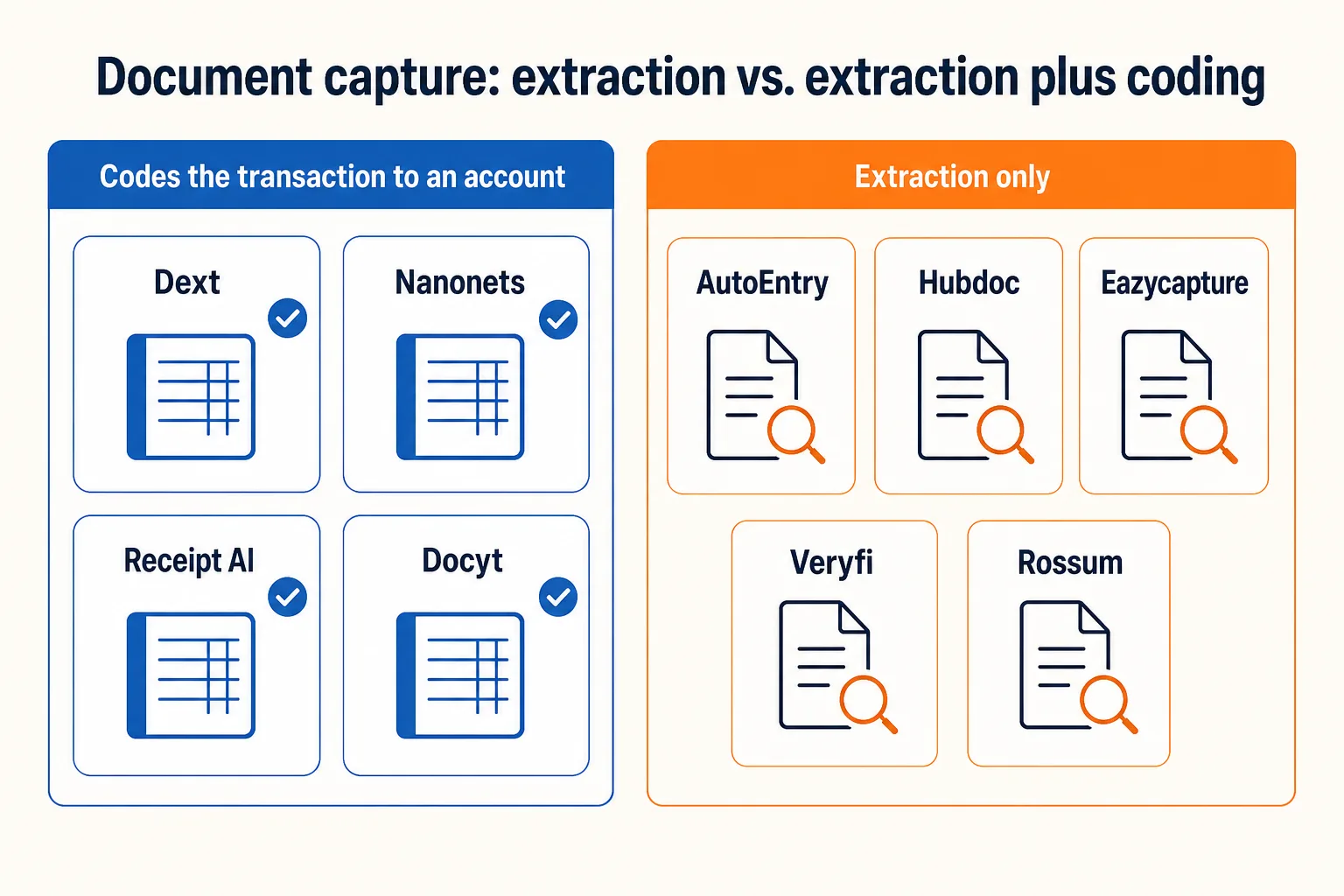
Nine document capture tools split by whether they code the transaction to an account: Dext, Nanonets, Receipt AI, and Docyt add automatic coding; AutoEntry, Hubdoc, Eazycapture, Veryfi, and Rossum stop at structured field extraction

Extraction only vs extraction plus coding

ToolWhat it does past extractionVendor's own framing
DextBuilds categorization rules from prior postingsRepeat suppliers need less correction over time
NanonetsAuto-coding on extracted line itemsClassification AI included from the Growth tier
Receipt AICategorizes each receipt at capture"AI categorization" on every paid plan
DocytCategorizes against the chart of accounts overnightBuilt as a full AI bookkeeping platform, not just capture
AutoEntryNone; extraction onlyStates it "focuses on extraction, not coding"
HubdocNone; narrower fetch and extractVendor positions Dext as the coding upgrade path
EazycaptureNone; extraction onlySite describes extraction ready to post; no account-coding language published
VeryfiNone; developer maps the fieldsAPI-first, output is structured JSON, not a coded posting
RossumValidation and workflow routing, not GL codingBuilt for ERP document routing, not small-firm bookkeeping

If your invoices carry multiple line items and you need a tool that reads all of them rather than just the header total, that is a separate question from coding, and the field varies by tool; Best invoice OCR software in 2026 breaks down which of these nine capture full line-item detail. Once a document is captured and coded, where it lives afterward is its own decision too. AI document management for accounting firms covers the storage and retrieval side, which a capture tool does not solve on its own.

Why the split shows up in your bill and your correction queue

Extraction-only tools tend to be cheaper on paper. AutoEntry starts at $13 a month for 50 document credits, and Veryfi's API is free for the first 100 documents a month. But every one of those extracted records still needs a human, or a separate rules engine already configured in the ledger, to decide the account before the entry is final. That correction work does not disappear, it just moves off the vendor's roadmap and onto your team's desk, every single month.

Coding tools shift more of that decision onto the vendor, and the pricing usually reflects it. Dext has stopped publishing a price list at all, quoting by sales call around user count and document volume. Docyt starts around $299 a month. The trade is real: less manual coding time in exchange for a higher or less predictable bill. For a firm with a small number of complex clients where a bookkeeper spends real hours coding entries by hand, that trade usually pays for itself. For a firm with simple, repetitive receipts where the coding decision barely varies, an extraction-only tool paired with the ledger's own bank rules can do the same job for less.

The full pricing mechanism breakdown across all nine tools, including which charge per client, per document, per seat, or by custom quote, lives in the hub article this guide sits under. Capture and coding are one piece of where bookkeeping hours go; for the other three, bank feed categorization, close-time review, and client document chasing, see AI bookkeeping tools compared.

Three questions that surface the real answer

Ask a vendor these three before signing, since the marketing page rarely answers them directly:

  1. Does the tool assign a ledger account, or just hand me a set of fields? If the answer is fields, budget for someone to do the coding, either a person or your accounting software's own bank rules.
  2. Does the coding improve as I correct it, or is it the same rule every time? A tool that learns from correction gets cheaper to run over time. A static rule set costs the same effort every month, indefinitely.
  3. What happens to a document the tool cannot confidently code? Every tool in this category, coding or not, needs a fallback for messy inputs like handwritten notes or unfamiliar suppliers. Ask what that fallback looks like before volume makes it a daily problem.

Common questions

Is AI-powered OCR just marketing for the same product?

Not entirely. The reading step, turning an image into structured fields, is close to commodity quality across the tools worth considering. The real difference sits in what happens after that step: whether the tool codes the transaction to an account automatically or leaves that decision to you. That distinction, not the label on the pricing page, is what to check.

Do I need a coding tool if my accounting software already has bank rules?

Maybe not. QuickBooks and Xero both let you set rules that auto-categorize recurring transactions once they hit the bank feed. If your document volume is low and your suppliers repeat predictably, extraction-only capture paired with those built-in rules can cover the same ground as a dedicated coding tool, for less.

Which tools should a firm with complex, high-volume invoices look at first?

Dext and Docyt both build coding into the core product rather than treating it as an add-on, which matters more as invoice complexity and volume climb. For enterprise-scale ERP routing specifically, Rossum handles the volume but leaves coding to the ERP's own workflow, not to the capture layer.

Can I mix an extraction-only tool with a separate coding step?

Yes, and it is a common setup. A firm might run AutoEntry or Veryfi for capture, then rely entirely on the accounting software's bank rules for coding, rather than paying for a tool that bundles both. It works best when the client roster is simple enough that rule-based coding rarely needs a manual override.

If you would rather match your firm's document volume and ledger to a tool directly than work through the comparison yourself, the CurateSuite matchmaker asks a few questions about your firm and returns the tools that fit, results shown immediately with no email required.

Find the right AI tools for your firm

Seven questions, two minutes, a short list of the five tools that fit your firm best. Your results, instantly. No sign-up needed.

Take the matchmaker

Tools referenced in this article

More articles

Last updated 2026-07-20. Tool comparisons are based on vendor-published specs. See our methodology.