CurateSuite's catalog holds structured pricing data for 101 AI accounting tools, and the pattern in that data is not what a stack of vendor pricing pages would suggest. Whether a tool publishes a number at all tracks its category almost exactly. Among client-onboarding tools, 1 in 8 hide the price behind a sales call. Among compliance and governance tools, every single one does. Pricing opacity is not spread evenly across the market. It is concentrated in exactly the categories where a firm has the least room to negotiate, because the purchase is usually driven by a deadline or a client requirement rather than a genuine choice between options.
That pattern matters more than another list of headline prices, because the headline price is rarely what determines the real bill. The five-question framework for evaluating AI accounting software puts "what does it actually cost at your firm size" as question three, after fit and before data handling, precisely because sticker price and actual cost diverge so often. This article works through what the published numbers in CurateSuite's catalog show: how AI accounting tools actually charge, which categories hide their price and why, and which billing structure quietly punishes a firm for having more clients rather than more staff.
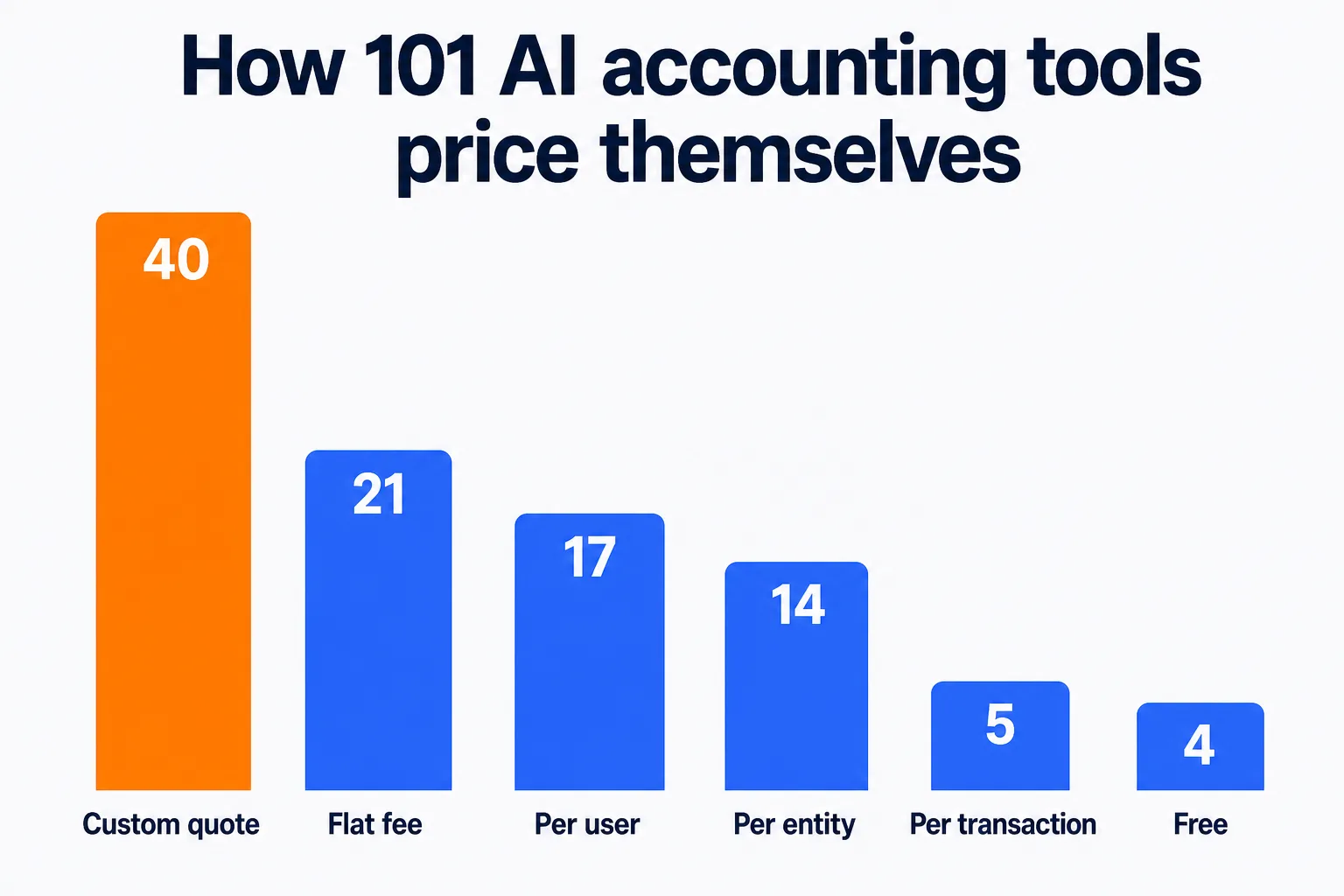
Six structures cover all 101 tools in the catalog, and the split between them is close to even, which is itself worth knowing before a demo call starts throwing around plan names.
| Pricing model | Tools in the catalog | What it means | Example |
|---|
| Custom quote | 40 of 101 | No published number; price is set per deal | CaseWare, Drata |
| Flat fee | 21 of 101 | One price regardless of team or client count | Hubdoc at $12 a month |
| Per user | 17 of 101 | Price scales with staff, not clients | Karbon at $59 a user a month |
| Per entity | 14 of 101 | Price scales with client or company files, not staff | Xero at $25 a month per organization |
| Per transaction | 5 of 101 | Price scales with volume processed | TaxJar at $39 a month base |
| Free | 4 of 101 | No paid tier needed to use the core product | Wave Accounting |
Trial access is a separate question from price. Of the 101 tools, 46 offer a free trial and 17 offer an ongoing free tier rather than a time-limited one. A trial answers "can I try this before I sign," not "what will this cost my firm once it is running," which is the harder question a custom-quote tool leaves unanswered until a sales call happens.
The 40 custom-quote tools are not scattered randomly across the catalog. They cluster by category, and the clustering follows a near-perfect gradient from self-serve products up to enterprise, deadline-driven ones.
| Category | Custom-quote tools | Share |
|---|
| Compliance, privacy, and governance | 6 of 6 | 100% |
| Audit and risk | 10 of 12 | 83% |
| Tax compliance and research | 4 of 7 | 57% |
| FP&A and advisory reporting | 4 of 10 | 40% |
| Document capture and extraction | 3 of 9 | 33% |
| AP, AR, and payments | 4 of 14 | 29% |
| Core ledger and bookkeeping | 5 of 20 | 25% |
| Practice management and workflow | 3 of 15 | 20% |
| Client engagement and onboarding | 1 of 8 | 13% |
Every tool in the compliance, privacy, and governance category, including Drata, Vanta, and OneTrust, quotes price only after a sales conversation. The audit and risk category is nearly as opaque: CaseWare, MindBridge, and Trullion all sell on custom terms. The two exceptions in that category are worth naming because they are exceptions: Numeric publishes $30 a user a month and XBert publishes $29 a user a month, both aimed at a smaller, more self-serve buyer than the platform-scale audit tools around them.
The reason is not that compliance and audit vendors are secretive by nature. It is that those purchases are usually sold to a buying committee against a specific risk or a specific framework (SOC 2, a regulatory deadline, an auditor's request list), and the price depends on entity count, transaction volume, or scope in a way a single published number cannot represent honestly. A client-onboarding tool, by contrast, is closer to a self-serve purchase decision made by one person with a card, and the pricing pages read that way.
Per-entity pricing quietly penalizes firms with more clients than staff
Fourteen tools in the catalog price per entity: per client, per company file, or per organization, rather than per staff seat. Eleven of them publish a number.
| Tool | Category | Starting price | Billing unit |
|---|
| Zoho Books | Core ledger and bookkeeping | $0 | Per organization a month (free tier, revenue capped) |
| Aider | FP&A and advisory reporting | $10 | Per client a month, $150 monthly minimum |
| FreshBooks | Core ledger and bookkeeping | $23 | Per business a month |
| Xero | Core ledger and bookkeeping | $25 | Per organization a month |
| QuickBooks Online | Core ledger and bookkeeping | $38 | Per company a month |
| Digits | Core ledger and bookkeeping | $65 | Per business a month |
| Fathom | FP&A and advisory reporting | $65 | Per company a month |
| Booke | Core ledger and bookkeeping | $129 | Per business a month |
| Pixie | Practice management and workflow | $129 | Per month, up to 250 clients on the entry tier |
| Botkeeper | Core ledger and bookkeeping | $134 | Per license a month, billed annually |
| Keeper (now Double) | Practice management and workflow | $200 | Per firm a month, with per-client pricing inside that plan |
This is the structure worth pausing on before a demo, because it does something a per-user tool never does: it charges more as a firm wins more clients, independent of headcount. Aider, priced at $10 per client a month with a $150 monthly minimum, sounds inexpensive next to a $59-a-seat practice management tool until the client count clears 60, at which point the bill has already passed $600 a month for the same three-person team. A per-user tool like Karbon charges that same firm a flat $59 times the number of staff logging in, and adding another client costs nothing extra.
Neither structure is wrong on its own. A firm growing staff faster than clients gets a better deal from per-entity pricing. A firm growing clients faster than staff, which describes most bookkeeping-as-a-service practices in a growth phase, pays a rising bill for the same team size on every per-entity tool it runs. Before signing, run the math at the client count expected in twelve months, not the client count on the day of the demo.
For a mix of well-known tools across categories, here is what each currently publishes.
| Tool | Category | Pricing model | Starting price | Free trial |
|---|
| QuickBooks Online | Core ledger and bookkeeping | Per entity | $38/month | Yes |
| Xero | Core ledger and bookkeeping | Per entity | $25/month | Yes |
| Karbon | Practice management and workflow | Per user | $59/user/month | No |
| TaxDome | Practice management and workflow | Per user | $800/user/year | No |
| Canopy | Practice management and workflow | Per user | $74/user/month | Yes |
| Bill | AP, AR, and payments | Per user | $49/user/month | Yes |
| Ramp | AP, AR, and payments | Free | $0 | Yes |
| Botkeeper | Core ledger and bookkeeping | Per entity | $134/license/month | No |
| Dext | Document capture and extraction | Custom quote | Ask sales | Yes |
Figures reflect what each vendor publishes as of this writing. Confirm the current number on the vendor's own pricing page before committing a team or a client roster to an annual contract, since several of these tiers change what they include (user limits, transaction caps, entity counts) as often as they change the number itself.
What to ask before requesting a custom quote
For the 40 tools that will not publish a number, the sales call is unavoidable, but it does not have to be unstructured. Ask what variable actually drives the quote: entity count, transaction volume, employee headcount, or revenue band, since compliance and audit vendors typically price against one of those rather than a flat seat count. Ask for the number at current scale and at the scale expected in a year, the same math worth running on any per-entity tool. And ask what happens at renewal, since a first-year quote from an enterprise-sold category is a starting offer, not a fixed rate.
For a shortlist built around firm size, workflow, and budget rather than pricing model alone, 12 Best AI Tools for Accountants in 2026 covers specific picks by use case. CurateSuite compiles every figure on this page from vendor-published pricing pages and specification sheets; the full sourcing approach is on the methodology page.
Common questions
Mostly because the categories that hide price most, compliance, audit, and risk, sell against a specific framework or deadline rather than a simple headcount, so a single published number would misrepresent what most buyers actually pay. Self-serve categories like client onboarding and core bookkeeping publish a number far more often because the buyer is closer to a one-person purchase decision.
Is per-user or per-entity pricing better for an accounting firm?
It depends on which is growing faster, staff or clients. Per-user pricing rewards a firm adding clients without adding headcount, since the bill stays flat. Per-entity pricing rewards a firm with a stable or shrinking client list, since new hires do not raise the price. Run the math at next year's expected client count and staff count before assuming either is cheaper.
Four tools in the catalog need no paid tier at all: Ramp, Wave Accounting, Intuit Assist, and Brex. A further 17 offer an ongoing free tier alongside paid plans, which is a different thing from the 46 that offer only a time-limited free trial.
How do I compare custom-quote pricing across vendors that will not publish a number?
Ask each vendor for the same input variable, whether that is entity count, transaction volume, or seat count, and request a quote at your current scale and your scale in twelve months from every vendor on the shortlist. Comparing raw quotes without matching the input variable first is the most common way a custom-quote comparison goes wrong.
Not on its own. Several of the most expensive tools in the catalog, including TaxDome at $800 a user a year, offer no trial at all, while some tools with generous trials still land in the top half of the catalog by starting price once the trial ends. Trial availability and starting price are two separate variables, and a vendor can offer either without the other.
Working through pricing model, billing unit, and trial access for a specific shortlist takes longer than it should by hand. The CurateSuite matchmaker takes a few questions about firm size, budget, and workflow and returns the tools that actually fit, with results shown immediately and no email required.


